S100 Computers

Home S-100 Boards History New Boards Software Boards For Sale
Forum Other Web Sites Quiz Index    

A Short History of Microprocessors
The Intel 4004
Somewhat analogues to Stephen Hawkins equivalent of the "big bang" in his "A Short History Of Time", the equivalent singularity event for microprocessors was in the summer of 1969, when a then, little known company called Intel, was approached by a Japanese calculator manufacturer called Busicom to produce a set of custom chips designed by Busicom engineers for their new line of calculators. They came with their own circuit layout that had designed. It had a number of custom chips, each of which contained about 5000 transistors. A guy by the name of Ted Hoff at Intel was assigned to assist the team of Busicom engineers that had taken up residence at Intel to carry out the project. Hoff looked at the Busicom design and concluded it was way too complex to be cost-effective. Fortunately for them he had worked before with Digital Equipment Corporation's PDP-8 mini­computer, which had a very small instruction set. He reasoned that much of the calculator's complexity could be reduced if they used a small general-purpose processor.

Such a design, using software rather than electronics to do the calculating would be far more efficient and flexible.  It did not escape Intel's attention that it would greatly increase the memory requirements of the calculator, but then Intel was in the memory business at that time! Hoff also realized that this processor could be put to many other electronic applications as well. He pitched the idea to senior Intel management who to their credit, gave him the green light to go ahead. The Busicom engineers were still pursuing their original design when Hoff and his group started work on their new general purpose processor approach. And although the Busicom engineers had simplified their design, each chip still had over 2000 transistors.  It would take 12 such chips to make a functioning calculator. Hoff's team figured it would take only 1900 transistors to build his processor. Hoff's general-purpose processor design was chosen over the Busicom design, and Intel got a contract from Busicom to produce the chip that later became known as the famous 4004. Intel's big bang.

Producing the 4004 chip proved to be far more difficult than was earlier anticipated. In those days all lithographic layouts and designs were done by hand. Credit should really go to a guy named Federico Faggin who just  joined Intel in early 1970 (and who later founded Zilog) for getting chip production going. (At that time Intel had only 150 employees most of them operators working in the wafer fabrication and chip assembly lines. The entire R&D organization was about 20 people!).

Faggin brought with him two key inventions he made at Fairchild: the Buried Contact and the Bootstrap Load that were pivotal in making the 4004. He was at the time one of the few people experience in MOS logic and circuit design and had the crucial knowledge of the then new silicon gate process technology for the above "self-aligned gates". He took the 4004 chip from concept to silicon in just nine months.

At first Intel sold the 4004 exclusively to Busicom, but by the summer of 1971 they realized they had something special on their hands. They negotiated the right from Busicom to sell the chip set to other manufacturers. In November 1971 Intel advertised the 4004 as a four-bit processor that performed 60,000 operations per second. By February 1972 Intel had sold $85,000 worth of chip sets.  Management at the company started to realize they had a new focus.
  
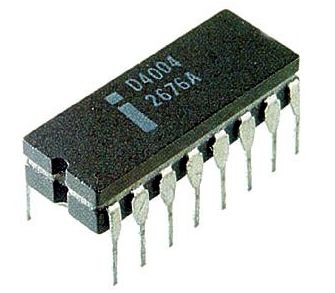
4004 CPU
            Intel 4004 CPU
   
The chip was primitive by today's design, it ran with a clock speed between 740 kHz to at the most 1 MHz.  It  could execute approximately 92,000 instructions per second and had separate program and data storage areas in RAM. It used a single multiplexed 4-bit bus for transferring: 12-bit addresses,  8-bit instructions and  4-bits of data.  It had a total of 46 instructions (of which 41 were 8 bits wide and 5 were 16 bits wide). The register set contained 16 registers of 4 bits each.   The datasheet for the 4004 can be obtained here


The Intel 8008
At the same time the 4004 was being developed, Another company called Computer Technology Corporation, (later renamed, Datapoint) placed bids with Intel and Texas Instruments to design a chip set for a new intelligent CRT terminal they were considering (Their popular Datapoint 3300 CRT terminal was plagued with overheating problems -- too many IC in a small space).

Both companies proposed an 8-bit general-purpose processor. Eight bits, because unlike 4-bits for calculators which work with BCD (binary-coded decimal), ASCII characters require 8-bits. Interestingly as it later turned out, CTC chose neither processor (Intel could not get their chip going in time, TI second sourced the Intel version but it proved buggy). CTC went on in the end to build its terminal with standard logic ICs. Fortunately TI and Intel went ahead with their "8 bit processor projects" anyway.  TI focused more on establishing intellectual property in the area initially while Intel quickly blasted ahead upgrading their 4 bit 4004 to the now famous general purpose 8008 "CPU".

The 8008, introduced in April 1972, was the first 8-bit microprocessor on the market. It required at least 20 support chips, but it had 45 instructions that it executed at 300,000 instructions per second, and it addressed a then whopping 16K bytes of memory. That was a lot of memory back then, The 8008 was considerable an upgrade of the 4004.   To some extent is was.
  8008 
         Intel 8008 CPU

The chip was implemented in 10 micron silicon-gate enhancement load PMOS. Initial versions of the 8008 could work at clock frequencies up to 0.5 MHz, this was later increased in the 8008-1 to a specified maximum of 0.8 MHz. Instructions took between 5 and 11 T-states where each T-state was 2 clock cycles. The 8008 had 3,500 transistors. The chip utilized a single 8-bit bus but required a significant amount of external support logic. It could access 8 input ports and 24 output ports.

Intel's primary goal with the 4004 and 8008 was to replace a large number of discrete IC's with a singe software driven CPU.  Few people thought that these chips were suitable for general-purpose computing. At best they were used for "demonstrating computer principles".  In 1973 Scelbi Computer Consulting Inc. announced the first general-purpose microcomputer based on the 8008 called the  SCELBI-8H.  The company was founded in 1973 by Nat Wadsworth and Bob Findley. The 8H came with 1K of RAM and was available either fully assembled or in a kit form, but it never really caught on.   SCELBI discovered that they could make more money selling microprocessor software books than hardware and the business switched to highly documented software published in book form.  There were a few other attempts; in particular the RGS-008 from RGS Systems and the Mark-8 by Jonathan Titus which was published in amateur-radio publications.  They too did not succeed.

That said, the 4004 and 8008 did find good traction in dedicated controller applications. The often mentioned "traffic lights" application is indeed true.  The datasheet for the 8008 can be obtained here

The Intel 8080
In April 1974 Intel announced the 8080, a significant upgrade to the 8008 that required only six support chips.  It had 75 instructions and a tenfold increase in throughput over the 8008.  It could addressed a whopping 64K bytes of memory.  The 8080 design was proposed by Faggin, but the design team was headed by Masatoshi Shima, a young engineer Intel had wooed away from Busicom (see above). Having learned from the limitations of the 4004 and 8008, the designers made improvements to make their new chip a truly useful computing engine. The 8080 really was the first microprocessor not aimed at simple discrete logic  IC replacement.  It looked much more like a computer than anything that had come before it, and it was also much easier to use from a hardware standpoint.
  
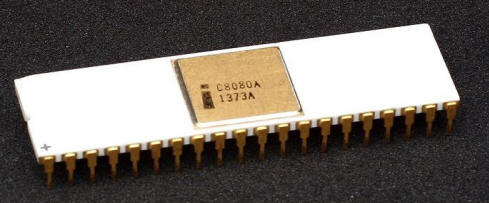
  8080
       Intel 8080 CPU
      
While it was an extended and enhanced variant of the earlier 8008 design, it did not maintain binary compatibility. The initial specified clock frequency limit was 2 MHz and with common instructions having execution times of 4,5,7,10 or 11 cycles.  This meant a few hundred thousand instructions per second. It was implemented using non-saturated enhancement-load NMOS, unfortunately demanding an extra +12 volt and a −5 volt supply.

An article in the January 1975 Popular Electronics magazine featured the first in a series of construction articles of a home computer utilizing the 8080 CPU.  It immediately caught on and sprung up a whole cottage industry. See below.


The Motorola 6800
Seeing the success of the 8080's success other major chip manufactures began to wake up. Motorola began working an equivalent chip which they called the 6800.  This chip was designed by a guy called Chuck Peddle. Motorola was the first company to introduce a complete line of peripheral chips designed specifically to go with its new microprocessor --thus providing a very integrated hardware solution. These chips included a parallel I/O port chip (the 6820), and serial port chip (the 6850).   Motorola also delivered with their chip set a data set manual that became the gold standard for the industry.  At $25 a pop everybody had to have one.  This probably more than anything else was that book that got many utilizing microprocessors in their hardware designs or as a hobby.
  
  6800 
      Motorola 6800 CPU 
       
This was also the beginnings of the two great microprocessor religions.   Intel and Motorola CPU's look at the outside world differently.   Intel treats all memory words with the low byte first in RAM then the high byte -- this is called "Little Endian" storage.  Motorola places the high byte first then the low byte -- this is called "Big Endian" storage.  Assemblers in the Intel world move data/registers right to left.  In the Motorola world it's the opposite.  Intel treats outputs to RAM and IO ports differently with separate hardware and software instructions. In the Motorola world, IO ports are simply special set aside RAM locations with no unique CPU hardware pins. 

BTW, the "microprocessor Endian camps" grew out of the mainframe and mini-computer camps which had grown up previously.  The first real "byte" oriented machine was the IBM System/360 mainframe (~1964).  This was a "Big Endian" machine.  Earlier IBM mainframes like the 7094 all the way back to the 709 (vacuum tubes) were 36-bit whole word only oriented machines.  The Data General NOVA series was 16-bit word addressed, and originally used Little Endian byte ordering in the software.  They later changed all of their software to big Endian.  This was probably because they introduced floating point hardware that used the IBM System/360 floating point representation, which was Big Endian. The DEC PDP-11 minicomputer (but not the earlier PDP-10) was Little Endian  as was the follow-on VAX-11.   The microprocessor world followed the mini/mainframe computer traditions, Intel went the Little Endian route following the DEC lead, and Motorola went the Big Endian route following the IBM lead.

In the early days (particularly for 16 bit CPU's, see below), Intel tended to designate specific registers to specific hardware/software tasks. Motorola tended to have more registers and treated them all the same.  Also in the early CPU's, Intel tended to utilize less silicon compared to the larger Motorola CPU's.  Each of the above have their followers and advantages.   Zilog followed the Intel model with its Z80, Z8001 etc. series, as did the strange Rockwell PPS-8 or Signetics 2650 CPU's.  On the other hand the MOS 6502 (but was Little Endian), Texas instrument TMS9900,  National Semiconductor PACE or NS16000 etc followed the Motorola camp.  This split exist even today with the IBM-PC/Clones/Windows world and the Apple family.


The MOS Technologies 6502 CPU
In early 1975 Chuck Peddle (and a few others), left Motorola and joined a company called MOS technologies. MOS back then was a small semiconductor design and fabrication company based in Pennsylvania.  They were setup to provide  a second source for Texas Instruments (TI) to provide electronic calculator chips.  Once TI started producing their own chips, MOS diversified and became a supplier to companies like  Atari, producing for example the single-chip Pong IC.

The Peddle team got the go ahead to build a new low cost 8 bit CPU. The result was the 6501.  While it was similar to the 6800,  by using several simplification tricks in the design, the 6501 could go be up to four times faster. Price was always a big selling advantage for the 6501. MOS simply outperformed others in early working chip yields.  (They discovered a way of fixing minor lithographic design layout bugs quickly and easily). 
   
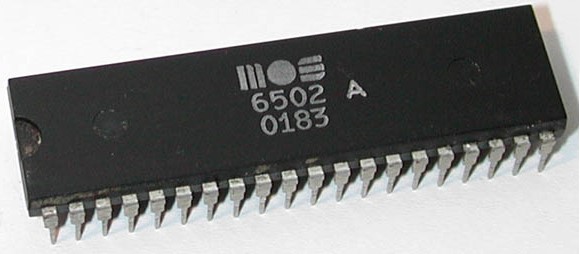
  6502 
    MOS 6502 CPU 
       
The 6501, while code incompatible with the Motorola 6800, however it  was hardware pin for pin compatible. Motorola sued and forced MOS to make a slightly different chip -- the now famous 6502. A CPU price war started. Intel and Motorola CPUs were at that time selling for greater than $170 each. The MOS chip was one quarter that number.  The 6502 would quickly go on to be one of the most popular chips of its day. A number of companies licensed the 650x line from MOS, including Rockwell International, GTE,  Synertek, and others.  Further improved versions came later for example the 6507 was used in the Atari 2600 or the 6510 for the Commodore 64.  Of course the most famous of all utilizers of the 6502 was the Apple.


The Texas Instruments TMS9900
As far back as 1976 TI introduced the TMS9900. It was in fact the first general purpose 16 bit microprocessor and was way ahead of its time in many respects.  (There were earlier 16 bits CPU's, for example bit slice logic chips or National Semiconductor's  IMP-16 chip set in 1972 or its later one chip incarnation called the Pace. However these were not really general purpose CPUs). 

In their wisdom however, Ti never courted the early fledgling hobby PC community and almost went out of their way not to provide support or encouragement to an individual developing a hardware project.  Ti's microprocessor focus then was large corporations and industrial applications! No TMS9900 S-100 boards were ever made. 
  
  TMS9900 
     Texas Instruments TMS9900  CPU 

The TMS 9900 had a 15-bit address bus, a 16-bit data bus, and only three special internal 16-bit registers.  What was unusual about this microprocessor was all its other general purpose user registers (16 in all), were actually kept in external memory. A single workspace register (WP) pointed to the 16 register set in external RAM (each 16 bits wide).  While unheard of today for a general purpose 16 bit CPU, this was OK at the time because most static RAM access times back then were faster than CPU register times.  The CPU had a simple but powerful instruction set. Fifteen of its 16 registers could be indexed, although it should be remembered these registers were actually in RAM.  Interestingly, illegal opcodes were treated as NOP's.  Also unusual, Serial I/O was available through address lines. Common today, unheard of back then. 

The TMS9900 was however later used in the TI-99/4 home computers. Unfortunately, to reduce the production costs, TI limited the system to just 128K of 16-bit words of the fast RAM that the TMS9900 could access directly. The rest of the memory was 16 KB of 8 bit RAM that was accessible only through the video display controller, which crippled the performance of the TMS9900.


The Zilog Z80

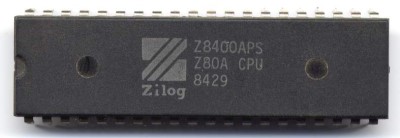
In 1976, Federico Faggin (see above) left Intel and formed his own company which they called Zilog Inc. He took Masatoshi Shima with him. Their goal was to build a better 8080. Almost immediately Zilog announced the Z80, a significantly enhanced 8080 that ran all of the programs written for the 8080.  Not only that, the chip could run at 4 MHz, twice as fast as the 8080. In addition it had many additional more powerful instructions than the 8080 (total of 176 in all). The early Zilog "Engineering Samples" were in fact manufactured in Dallas, not in Silicon Valley by a company called  Mostek, a Z80 later second source of the chip.  Needless to say the chip caught on very quickly.   The very first S-100 CPU board with the chip came from TDL in 1977.  Eventually every S-100 board manufacture had to have one. 
  
  Z80-2
                      Zilog Z80 CPU
     
On a wider scale however Zilog ran into a problem.  Even though the Z80 was a much more powerful chip than the 8080 in terms of its instruction set, very few people were writing software to take advantage of the Z80's extra instructions because the majority of the machines installed at that time were 8080-based, and if you wrote code that only ran on a Z80, your market would be considerably smaller.  Not helping matters, Gerry Kildall of Digital Research had a close connections with Intel and insisted in producing all his CPM code and BIOS examples in 8080 format.  (The Zilog mnemonics were more logical and easier to learn but never really caught on).

However on the hardware side, designers stopped using the 8080 in new computers. The Z80 was just a far easier chip to use, requiring no support ICs and a single voltage power supply. It was much faster, even if you didn't use the extra instructions. On top of all that, it had built-in support for refreshing dynamic RAMs -- something no other CPU had at the time.  This allowed the production of a very cost effective the Radio Shack TRS-80 (designed by Steve Leininger) amongst many other lesser well known single board 8 bit computers at that time.


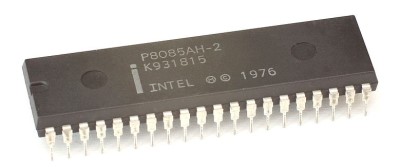
Intel 8085
Meanwhile, Intel had realized that the 8080 needed serious upgrading. In 1977 they introduced the 8085. It too had all the 8080 instructions, plus a few more. But Zilog had taken them by surprise. The enhancements that the 8085 had over the 8080 were nowhere near as extensive as those of the Z80. From a purely hardware standpoint, the 8085 was a much nicer chip than the Z80 in terms of clean simple signals lines, but the Z80 had mass appeal because it was faster. Intel had to come up with something fast!  When introduced, the 8085 ran at only 3 MHz compared to the 4-MHz chip that Zilog which was already shipping.  It was not a great success for desktop systems. However Compupro used it in their 8085/8088 S-100 board where for many it became their stepping stone from 8 bit hardware and software to 16 bit systems.  The chip did find some utility for standalone controller applications however.
  
  8085
           Intel 8085 CPU 
   
Like the Z80 it required only a 5 volt power supply and did not require a separate 8224 type clock generator as its parent the 8080 did. It contained 6500 transistors.   In a pattern later found in its 8086 (see below) cousin its data bus was multiplexed with the lower 8 bits of its address bus.  This is something the Z80 did not do. This all but killed any chance of the chip generating its own onboard dynamic RAM refresh as the Z80 did.

The 8085 did have better support for hardware interrupts over the 8080.  While they were nowhere near as powerful as those of the Z80 with its own onboard interrupt register, there were three maskable interrupts (RST 7.5, RST 6.5 and RST 5.5), an 8080 style interrupt pin and an NMI interrupt.  These too were really only suitable for stand alone controller type situations.  Nobody wanted to support these "special interrupts" in software for a small player in the 8 bit desktop arena.
 
Software/register wise the 8085 behaved like a faster 8080.


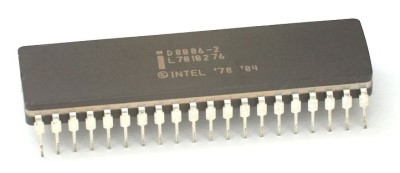
Intel 8088 and 8086
Intel realized that the 8080/8085 family needed serious upgrading. In 1976 they started to focus on a 16-bit processor.   They realized that earlier 16 bit designs never caught on because of the lack of software or incompatibility of software with the then current popular 8 bit systems.  They soon realized that direct opcode upward compatibility from the 8080 opcodes was not really practical.  Instead they settled for a situation where each 8080 register had its 8086 counterpart. This made 8080-to-8086 code translators possible and gave programmers a familiar starting point. This was a big factor in the success of the 8086, which was announced to the world in 1978.  
   
  8086 
               Intel 8086 CPU 
     
On top of that they added an option for hardware compatibility. Two 16 bit CPUs were designed,  the 8086 and an 8 bit 8088 CPU that behaved -- at least to some degree -- like an 8080/8085 externally, but behaved like a true 16 bit internally.  They also came up with the concept of a microprocessor  "bus-interface unit" (BIU). The BIU handled all communications with the outside world and was in charge of generating addresses and storing and retrieving data from the system. Inside the BIU was a queue. While the execution unit was busy crunching data, the BIU was out on the bus getting the next instruction and putting it in the queue. The 8086/8088 BIU can stay up to 8/6 bytes ahead of the execution unit by keeping bytes in its queue. Because of the queue, the 8088 performance only suffered an average of 20 per­cent compared to an 8086.


Intel did one other neat thing as well with the hardware.   They set aside one pin (33), called MIN/MAX, which when held high configured the chip as a simple 8085 style chip capable of directly addressing RAM, control lines and IO ports. This was useful for small dedicated microprocessor systems. When tied low however the microprocessor was completely reconfigured internally to talk externally to a bus controller (8288) and if required a "coprocessor".  For the latter there were two types. A math-coprocessor (8087) and an IO-coprocessor (8089).  This was before the days of sub-micron lithographic silicon layouts. Chip real estate was scarce. The concept of adding extra coprocessors on an as needed basis was smart. 

Finally also learned from Motorola the importance of good documentation/manuals.  Bookstores became flooded with 8086 hardware and software manuals.  Much to Intel's relief IBM chose the 8088 as for their PC.  The rest is history.

The clock frequency of the early 8086s  was limited to 5 MHz,  but the later versions in HMOS were able to reach 10 MHz and above. HMOS-III and CMOS versions were manufactured for well into the 1990s by many second source manufacturers (Fujitsu, Harris/Intersil, OKI, Siemens AG, Texas Instruments, NEC, Mitsubishi, and archrival AMD). There were a large number of successful S-100 8086 and 8088 boards produced (e.g.. Compupro, Lomas, Seattle Computer to mention a few).


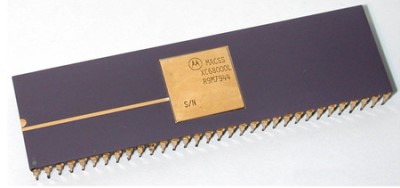
The Motorola 68000
In 1976, designers at Motorola were working on a new 16-bit microprocessor as well. Their focus was software more than hardware. The wanted to have a CPU with internal 32 bit registers and an external 16 bit interface.  Unlike Intel, they wanted to eliminate any special-purpose instructions and allow the microprocessor to perform all operations, on all registers, on all data types, and in all addressing modes.  Assembly language programmers like this because it means they don't have to memorize a bunch of exceptions to the instruction set.  However this advantage is limited because the bulk of code programming even at that time was above this level of detail.  That said, the 68000 leant itself to UNIX style  systems. There were a number, but none really became successful.  If it were not for the Apple Macintosh the 68000 CPU would have probably have ended up like some of its relatives, the Zilog 8000 or National 16032 (see below).
   
  68000
         Motorola 68000 CPU 
   
Not to be outdone in hardware Motorola also came out with an 68008, an 8-bit-bus version of the 68000, similar in concept to the 8088. However, the 68000 had no real internal queuing capability, and that meant that the 68008 ran half as fast as the 68000. This made the 8088 look even better!

The clock frequency of the early 68000s  was limited to 6 MHz,  but the later versions were able to reach 20 MHz

The 68000 could address 16 MB of physical memory with byte resolution. Address storage and computation used 32 bits, however, with the high-order byte was ignored due to the physical lack of pins. This allowed it to run software written for a flat 32-bit address space. Motorola's intent with the internal 32-bit address space was forward compatibility, making it feasible to write 68000 software that would take full advantage of later 32-bit implementations of the 68000 instruction set.  The CPU also had a System and User mode where certain instructions were not available in user mode.   There were a number of successful S-100 68000 boards produced (e.g.. Compupro, Dual Systems).  BTW, Alan Wilcox wrote an excellent book ("68000 Microcomputer Systems", Prentice-hall, Inc, 1987) about putting the 68000 on the S-100 bus. A very interesting read.


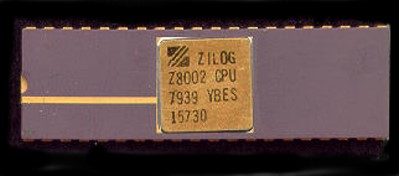
The Zilog Z8000
Flush with it's initial success with the Z80,  Zilog too started thinking about a 16 bit microprocessor.  Masatoshi Shima (see above)  begun working on a 16-bit processor, the Z8000, using "hand drawn" random logic.  Random logic is fast and worked fine for the 8080 and Z80 but for larger more complex CPUs things get too complicated the logic gates become a true can of worms. CPUs like the 68000 used internal micro-code ROMS to control the chip. To make changes you just change the microcode.  Not so for random logic. Bugs continuously cropped up is early Z8000 designs. To make matters worse Shima left Zilog to return to Intel delaying the final Z8000 even further.  The last straw for many potential customers was the Z8000's lack of a similar instruction set to the Z80 - as the 8086 had.   The chip never became successful and was the start of a slow lingering death for Zilog.  Zilog did go on to produce a 32 bit processor (the Z80000). It was a phenomenal chip internally, but sadly the damage was already done.
   
  
  Z8002
         Zilog Z8002 CPU

The register set consisted of sixteen 16-bit registers  that could use or combined to act as 8-bit, 16-bit, 32-bit, and 64-bit registers. The register set was completely orthogonal, with register 15 conventionally designated as stack pointer, and register 14 normally used for a stack segment. There was both a user mode and a supervisor mode and like the Z80, the Z8000 included built-in DRAM refresh circuitry.

It should be mentioned there was no actual Z8000.  The actual chips were the Z8001 and Z8002.  The Z8001 utilized a segmented memory approach like the 8086 (using a 16 bit offset and a 7 bit segment value).  However unlike the 8086 they were not added internally but required external hardware. The Z8002 was a simpler non-segmented version.  I know of no S-100 Z8000 CPU boards being made.


The National Semiconductor 16032 CPU
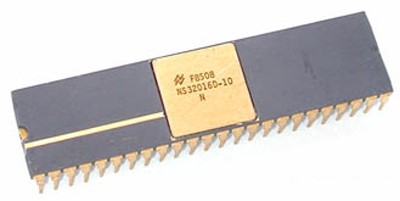
National realized they missed the boat for early 8 bit microprocessors.  Their early SC/MP 8 bit CPU which with its limited addressing capability (4K), was really best suited as a simple micro-controller.  In 1981, National Semiconductor made a second attempt at the microprocessor market with the 16032. (It was later renamed 32016 to emphasize its 32-bit internals). The 16032 had a 32-bit (internal data bus) microprocessor with a 16-bit external bus.  The chip had a basic clock speed of 10 MHz.  It had eight 32 bit general purpose registers which could be used as bytes, words or double words. However unlike the Z8000 or 8086 bytes were restricted to the 8 least significant 8 bits.
    
  NS16032
     National Semiconductor 16032 
   
Since Motorola had never been able to produce their promised math coprocessor at the time, and Intel's 8087 couldn't break the 5-MHz speed barrier, everyone was impressed when National announced its math coprocessor would run at 10 MHz,  twice the performance of Intel's 8087.  It did, the only problem was National could not produce its 16032 bug free in decent quantities.   Programmers liked its instruction set, which reminded them of a VAX. Because the VAX has been so successful for running UNIX, the 16032 seemed like a shoe-in for a UNIX computer. However the hardware delays as in the case of Zilog, prevented the microprocessor from getting traction in the early marketplace. It never recovered.  I know of only one S-100 16032 based CPU board being made (Compupro), but I have no information about it.


The Intel 80286
Having learned their lesson from being asleep at the wheel when the Z80 overtook the 8080, Intel did not want to make the same mistake with the 8086.  Realizing that the 8086 was limited to 1M of RAM and did not even have a User/System partition of opcodes (something the other 16 bit CPUs already had), Intel quickly got going on an improved 8086 which became the 80286.  (There was one side step in the form of the 80186 which was a 8086 with a DMA controller, Interrupt controller  IO ports etc onboard.   However this CPU really was meant to be for dedicated controller applications rather than a general computer.  There were one or two S-100 boards made that utilized the 80188 (e.g.. Lomas, IMS) , but the hard wired IO port addresses within the  80186 CPU caused conflicts with other popular S-100 boards in the bus).

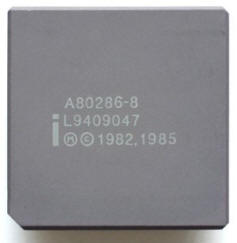
The 80286 was introduced in 1982. It had back then a whopping 134,000 transistor count.  It was the first Intel CPU with memory management and memory protection abilities.  Initial versions had a clock speed of 6 Mhz.  This later was extended by Intel and AMD to 12MHz and above.
 
The 80286 operated in an 8086 "Real mode" where it behaved like an 8086 or in "Protected mode" where it could access up to 16MB of RAM.  However its onboard memory management allowed software to operate with up to 1 GB or virtual RAM.  The 8086 style segment registers in protect mode pointed to special tables in RAM that controlled all the CPUs RAM access. 

  80286
      Intel 80286  CPU 
   
The chips real claim to fame was that is was used in the IBM-PC/AT computer.  However in that box it really functioned as a faster 8086.  The chip had a severe limitation in that it could not reverted back to real mode from protected mode without a hardware reset. This was just not practical on the PC/AT.  Consequently there was never a significant interest in true 80286 based operating systems. Digital Research tried with Concurrent DOS 286, but CPU chip bugs delayed the product until it was too late.  MS-DOS remained 8086 based on PC/AT's.  There were a number of successful S-100 80286 boards made (Compupro, S C Digital, Macrotech are good examples).


The National Semiconductor 32032
National took one more crack at the general compute/CPU market.  They were the first company to announce and ship a full-blown 32-bit microprocessor in 1984. The 32032, which used to be the 16032, was code-compatible with the 32032.   If life was fair it should have been a successful chip but it was becoming increasingly clear they the desktop computer world only had room for Intel and Motorola based chips.  Nevertheless the 32032 was an amazing microprocessor. 
  
  32032
          National Semiconductor 32032 
   
The 32032 had 8 general purpose 32-bit registers, plus a few special-purpose registers.  The instruction set was very much of the "Complex Instruction Type", with 2-operand instructions, memory-to-memory operations, a number of very flexible addressing modes, and variable-length byte-aligned instruction encoding. Addressing modes could involve up to two displacements and two memory indirections per operand.  National continued to try and keep their 32032 opcodes similar in spirit to (but not compatible with) the then popular DEC VAX minicomputer instruction set.

Throughout the 80's they continued to produce updates of the chip in the form of a 32332 and 32532 CPUs,  all the time maintaining a good degree of compatibility, with much improved reliability and performance.  However the complete line was largely ignored by the desktop PC market.


The Motorola 68020
, 68030, 68050
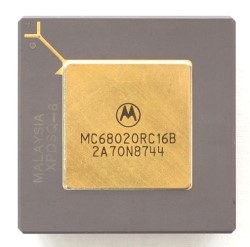
In 1984 came out with its full 32-bit extension to the 68000, the 68020. Initial clock speeds were 12 MHz but this later went up to 33MHz.  It had one neat feature, you could dynamically choose the bus size you want—8, 16, or 32 bits with two external pins on the chip.   This for example allowed you to use a single boot ROM instead or 2 (or 4) as was the case in the with 16 bit wide systems.  They also picked up on the Intel idea bus buffering by using an efficient "cache". The cache in the 68020 was 256 bytes deep and works a little differently from the 8086 queue. If a jump occurs to a point in the queue, the queue was flushed and reloaded. But the cache looks just like memory, so a jump to a point in the cache would not cause the cache to be dumped and re­loaded. If loops are small enough, they can execute directly from the cache.
  
  68020
           Motorola 68020 CPU
  
Yes there was 68010. It was really a patched bug repaired version of the 68000 that was supposed to work with Motorola's memory management chip (68451). Suffice to say there were problems.

The 68020 added many improvements to the 68000 including a 32-bit external data bus and address bus, and a number of new instructions and addressing modes.  There were also some minor improvements and extensions to the supervisor state.  The 68020 had a coprocessor interface to incorporated a paged memory management unit (MC68851 PMMU) or a floating point unit (MC68881 or MC68882 FPU) . There was the capability to do bigger multiply (32×32→64 bits) and divide (64÷32→32 bits quotient and 32 bits remainder) instructions, and bit field manipulations were improved.

Unlike its 8086 cousins the 68000 could only access word (16 bit) and long word (32 bit) data if they were word-aligned. The 68020 finally had no alignment restrictions on data access. However, unaligned long word accesses were often much slower than aligned accesses as was the case for the 8086.

The 68030 released in 1987 had an on-chip memory management unit  (but still  did not have a built in  floating point unit).
The 68040 was released in 1990 finally also had the floating point unit on board.  It could only reach a speed of 40 MHz because of severe heating problems. 

In a side by side comparison with the Intel equivalent of the time, the 80486 (see below), the 80486 won hands down because the 80486 could simply be clocked faster without overheating.

The 68020, 30's and 40's  were all used in the Apple Macintosh II and later PC lines as well as Sun 3 workstations.


The Intel 80386
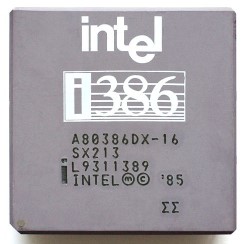
In 1985 Intel introduced its own 32 bit entry into the arena. It became known as the 80386. Initial versions had about 275,000 transistors and ran at 12 MHz. This CPU has been tweaked and improved many times with the later versions capable or attaining a clock speed of 40 MHz (AMD version).  As with the 80286, in real mode, the 80386 was upward code compatible with the 8086.

Intel copied the useful concept of dynamic bus sizing that Motorola used on the 68020. So 80386 motherboards only needed one (large) BIOS/boot  EPROM.   The simple, but limited, segment based memory management system of the 80286 now had a true flat 32 bit address space capability that allowed you, even in real mode, to address up to 4 GB or RAM.  (Note however that in real mode, index offsets (ESI, EDI etc.) were still limited to 64K).
   
  80386
     Intel 80386  CPU 

The 80386 probably represented the apex of 32 bit CPU era.  It was a very sophisticated chip with three different modes of operation, Real, Protected and Virtual 8086. The latter allowed you to have multiple isolated 8086 like sessions on the same system.  it was often touted but seldom used.  The real power of the chip was its protected mode of operation.    This allowed the programmer to have true virtual memory, paging and fault detection.   Unfortunately setting the chip up in this impressive mode is quite complex.  If you are thinking of doing it read James Turleys book "Advanced 80386 Programming Techniques".

The good news is that once in this mode the chip behaves like a mainframe computer of even its own era.   The 80386 could work with the (slow) 80287 math co-processor but worked best with its own 80387. 

One unusual feature of the 80386 was the values of its CS & IP registers on reset.  The first instruction is fetched from FFFFFFF0h, even though the reset value of CS is F000h and IP is FFF0h. This value would normally select an address of 000FFFF0h, which is 16 bytes from the end of a 1MB address space. In fact, the 8086/88 and 80186/88 do select this address. However, when the 80386 is reset, the address pins for A20 through A31 are automatically driven high for instruction fetches and other references to the code segment (CS). This creates a physical address that is higher than the linear address that CS and IP would indicate. By changing the CS-relative address in this way, the 80386 makes it easy to place a bootstrap ROM at the extreme upper end of the 80386's 4GB address space, instead of near the 1MB boundary.   This "artificial" CS addressing stays in effect until the first CS altering instruction is used (e.g. JMP FAR).   After that any address on the external address lines are a result of the CS and IP registers.

The chips first claim to fame was that it was the CPU used in the initial Compaq desktop computer. Even with later more advanced CPU's, the 80386 continued in production at Intel until 2007. It found wide application in embedded systems and some mobile phones etc.
 
There were almost too many variations and versions of this chip to count.  There was a long legal dispute between Intel and AMD over the latter's right to produce the chip.  AMD ended up making their own 80386 "look alike" that turned out in fact to be a faster more energy efficient chip to the Intel version.


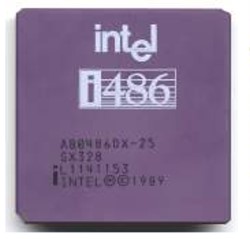
The Intel 80486
The 80486 was outwardly less of a dramatic upgrade from its microprocessor (the 80386).    It was introduced in 1989. It was on the surface just a faster 80386 with the 80387 math coprocessor now onboard.  The initial clock speed was 16 MHz, but over time this rose to 100M Hz. It reportedly contained over one million transistors.  
  
  80486
       Intel 80486 CPU 
   
From a performance point of view, the architecture of the 80486 was a vast improvement over the 80386.  The old 8086 style "bus-interface unit" (BIU) was considerably enhanced.  Simple instructions (such as MOV reg, reg) executed in one clock cycle.  There was no 68020 style cash on the 80386 (see above). The 80486 made up for this by having a large (8 KB) on-chip cache to store the most recently used instructions and data.  All in all there was doubling of the chips performance over the 386 at the same clock rate.  The 80486 was Intel's answer to AMD's 80386 that was beginning to eat into Intel's lead. It took AMD almost four years to come our with their 80486. It was lower priced and again faster, but it was too late.


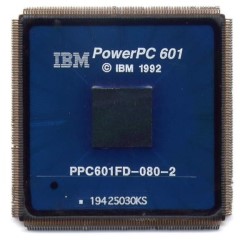
The Power PC
Ever since the 70's academic researchers, IBM and others had been exploring the utilization of small but highly efficient opcodes to drive CPU's.  These were called Reduced Instruction Set Computers or RISC.  In the early 1990's they were all the rage.  Even Intel plunged into the effort with its  i960 (80960) in 1990.   
  
  Power PC
        IBM Power PC CPU 
   
The Power PC was based on the utilization a RISC instruction set to drive the microprocessor.  It was the culmination of a three way research collaboration between IBM, Apple and Motorola in the early 1990's.   Initially it was met with much enthusiasm.  In addition to Apple, both IBM and the Motorola offered systems built around the processors.  Microsoft even released a version of Windows NT 3.51 for the Power PC chip.  In the end however demand for the new architecture on the desktop never materialized. Windows, OS/2 and Sun customers, faced with the lack of application software for the PowerPC, almost universally ignored the chip.  Only on the Macintosh, due to Apple's persistence, did the PowerPC gain traction. To Apple, the performance of the PowerPC was a key selling point in the face of increased competition from Windows 95 and Windows NT-based PCs.  However in the end they too switch over to Intel chips.  Intel and Motorola later went on to increasing processor efficiency by internally utilizing elements of RISC coding but externally sticking to their old opcodes.   This way, no application software changes were required.

As a side note, the Power PC did go on to find a very successful niche for itself in dedicated microprocessor applications -- particularly in the auto industry.


The Intel Pentium Family
Intel Pentium was the fifth-generation of the 8086 architecture design.  The original Pentium was introduced in early 1993 as a successor to the 486 line. The Pentium was originally to be named 80586 but the name was changed to Pentium because of a  trademarked issue.
  

  Pentium
     Intel Pentium CPU 
     
It was the first Intel CPU to utilize sub-micron etching. The early versions of the Pentium had a problem in the floating point unit that in rare cases, resulted in reduced precision for some division operations. This bug, discovered in 1994, was an embarrassment for Intel but was quickly corrected.  The original Pentium chip contained over 3 million transistors.  The Pentium "family" has going through a numerous versions of names improvements over the years. These include:-
  

Name Speed Cache Size (L2) Comments
Pentium 60 MHz 16 K Introduced 1993. The original family member
Pentium Pro 150 MHz 256 K Introduced 1995,  Had a second level on-board fast cache
Pentium II 233 MHz 512 K Introduced 1997. Added MMX instructions. Packaged on a circuit board.
Pentium III 450 MHz 512 K Introduced 1999. Also packaged on a circuit board
Pentium 4 2.4 GHz 1 MG Introduced 2000
Pentium D 2.6 GHz 2 MG Introduced 2005
Pentium M 1  GHz 2 MG Introduced 2003
Pentium Dual-Core 2.4 GHz 1 MG Introduced 2007
Pentium Quad-Core      

For over a decade Intel continuously tweaked and upgraded the Pentium line of microprocessors. Today internally, the Multi-Core CPUs show little resemblance to the original Pentium of 1993.

The Pentium Pro introduced the concept of out-of-order code execution and an integrated a second level cache on the chip.
The Pentium II line added the "MMX" instructions.  These were opcodes that utilized 8 new 64 bit registers for floating point operations.  Intel made great in-roads in tailoring the above chips for low power applications for laptops.  Most, such as the "Celeron" series, were somewhat stripped down versions of the parent with smaller onboard caches.

In 2000, Intel introduced their so called  "NetBurst" micro architecture with their Pentium 4.  This was a very deep pipeline (20 stages), with some very sophisticated logic involving dual ALU's etc. to maximize throughput. Clock speeds went up enormously (into the GB range) and were really only limited by heat dissipation.

The Pentium D introduced in 2000, was the start of the wave of having multiple completely independent CPU core processors on the same chip. The trend continues, today the above family of Pentium CPUs probably run on more desktop PC's than all other desktop CPUs combined.


A Short History of the S-100 BUS.

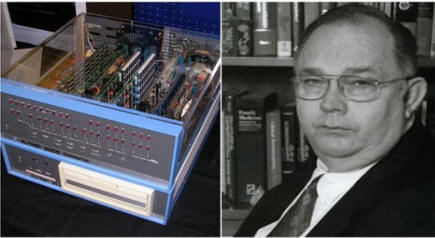
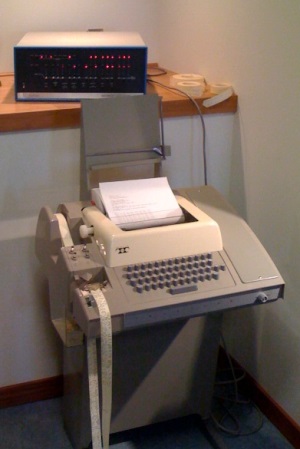
The S-100 Bus started life in 1974 when Ed Roberts* set about designing a home "micro-computer" kit for electronics hobbyists. He set about designing the now famous Altair 8800 utilizing the Intel 8080 CPU. Apparently he could not get a proper bus motherboard  made in time to Altair CPU (Small)coincide with an article in the Magazine Popular Electronics then due out in Jan 1975.  He looked around Altair with TTYfor some suitable edge connectors that could be strung together. He came across a supply of cheap 100-pin edge connectors and decided to use these on a short board of 4 connectors at a time. Later hoping to link multiple boards together to form a bus. The micro-computer kit took off. He called the bus the "Altair Bus". It was an instant hit and soon sparked a whole cottage industry of Altair bus compatible machines. Almost immediately the company (MITS) took off.

(*Sadly, Ed passed away in early April 2010. He left the S-100 Computer business early to become a country MD -- something he always wanted to do.)  

 
In 1975 another company IMSAI, came out with what became the gold standard S-100 motherboard and computer.  Other well respected early Altair bus complete computers at the time were  Cromemco and Processor Technology. Roger Mellon of Cromemco, referred to the bus as "The S-100 bus". The name stuck.  That same year Processor Technology sold a 4K static RAM S-100 board launching a cottage industry of S-100 add-on boards.
 
A very typical setup was to connect the Altair to a Teletype printer. The Teletype printer could act as an input device, and you could use the paper tape to save and reload small amounts of code. One thousand bytes of code was a lot in those days! This setup was the basis of CPM's consol IO and data redirection and can be found in monitors like TDL's Zapple Z80 Monitor. 
     
In 1976 Cromemco introduces the TV-Dazzler a dual S-100 video board.  The same year the disk operation system CP/M was advertised in BYTE magazine for the first time. However floppy disk based systems were still out of reach of most uses at that time. 
Nevertheless the market expanded rapidly. Soon many other companies sprang up making individual S-100 boards.
  
In 1977 Tarbell introduced the widely popular Tarbell S-100 cassette controller board, which allowed users to load, save and exchange software with colleagues. It is now forgotten the impact this board had on knitting users together. It was the first general medium for example in which commercial software was sold.  Specialized S-100 boards started to appear. That same year DC Hayes introduced the first Modem S-100 board launched. TDL launches its Z80 S-100 board.  This board along with their famous "System Monitor Board "(SMB) made setting up a complete and functional micro-computer easy.  The bus had gotten critical mass and momentum. Other complete S-100 bus computer systems like Northstar and Victor Graphics S-100 Computers were introduced.  The boards themselves became more multifunctional and complex. S-100 board manufactures such as Morrow Designs, Godbout Electronics and SD Systems etc. were good examples of this.
     
1978
saw the widespread introduction of floppy disk systems. Initially the Northstar hard sectored 5" disk system was popular but this later gave way to a number of soft sectored format 8" and 5" CP/M systems. The  popular and reasonably priced  SD Systems Versafloppy S-100 board was introduced that year. The 5" Shugart floppy drive started to be used by hobbyists. 
That year a company called Micro Pro Int. announced Word Master a word processor precursor to Word Star the first widely used word process or for PC's. That year also Epson announces the MX-80 dot matrix printer, which establish a new standard in high performance printing for a low price.
 
In 1979 Seattle Computer Products ships its 8086 S-100 board. In a little noticed event at the time, this also was that year also
Xerox, DEC and Intel introduced the "Ethernet" standard for local networks.
 
Against this background slight differences in signal timing between some board manufactures became a problem. A standards committee was formed to define the S-100 bus. This helped. The standards group later went on to introduced a 16-bit data bus to the S-100 bus for 16 bit CPU's.  (Towards the end of 1983 it was standardized as the S-100 IEEE-696 standard).
 
By 1979 the initial S-100 companies IMSAI, MITS, TDL and Processor Technology had evolved into other companies.
For example, Ed Roberts of MITS sold Altair to a company called Pertec because his personal goals were to make money to become a medical doctor (which he did).  IMSAI no longer was the dominant company it once was.  The whole field was evolving very rapidly. By 1979 there were probably over one hundred S-100 companies making boards or writing software for them.
 
That same year Intel introduces the 5 MHz 8088 microprocessor, a 16 bit CPU with an external 8 bit interface. Early prototype S-100 boards with 16 bit CPUs were being tested.
    
If 1978 was the year of the floppy, 1980 was the year many people switched to hard disk based CP/M systems.  A typical starter system consisted of one Seagate "Winchester" 5", five Mg of storage. At this stage S-100 computers were becoming quite sophisticated.  Primitive multi-user/network systems were also starting to appear in corporate environments.  The S-100 bus evolved into the standard for all "professional" personal computers most of which ran CP/M. 

In 1981 IBM introduced the PC with its own IBM-PC ISA bus.  The home computer landscape changed forever.

In 1982  Digital Research started selling CP/M-86. While it found a home on some S-100 systems, most users utilized MS-DOS with the IBM-PC. 16 bit S-100 systems were starting to appear in numbers.
  
As microcomputers got smaller and faster, S-100 became obsolete.  The boards were becoming too large for the improved IC chip packaging of the time.  With the introduction of the IBM-PC ISA bus, the S-100 bus started to go out of favor.  However 10's of thousands of these boards still lie around. Some in functional systems, many in attics or basements.  In the past few years there has been a revival of these old systems and a new era of S-100 computers has appeared.  Hobbyist like those in the vintage car industry are actively getting together to bring new life to these wonderful machines.
  
Unfortunately because the bus fell out of active use just as it was to approved by the standard committee of the IEEE. It was withdrawn in the 1990's because there was really nobody around to push for it. A great disappointment to many later.

 
The history of individual S-100 companies is outlined further under the S-100 Boards section.


The S-100 BUS Pin Designations and Board Layout
The original S-100 board bus interface pins were laid out (in a hurry) by an unknown engineer who worked as a contractor for MITS.  Unfortunately the pin arrangement is somewhat hap-hazard and not the best for noise resistance either. The exact pin placement/function on either side of the board was simply determined by the easiest way to bring all the 8080 pin signals down to the bus with a minimum of plated through holes on the board.  This was done before the days of the efficient CAD/CAM PC board layout programs we have today.   If you look at this 8080 board, there are remarkably few plated through holes on the board.  Fortunately MITS had the foresight to include S-100 bus vector interrupt and a DMA request line even though they were not used in those early systems.  Here is a picture of a very early MITS 8080 CPU board:-

The Origional 8080 MITS CPU Board

 
The following is a list of the pins of the S-100 bus as describe in the IEEE-696 specification along with some comments.
The original draft submitted to the IEEE can be obtained here.
The final version can be obtained here.
   

PIN#    NAME                                    COMMENTS 
1  + 8 Volts     The instantaneous minimum must be greater than 7 volts. The average maximum must be less than +11 volts and the  instantaneous maximum must be less than 25 volts.  The optimum voltage is 8 Volts,  but many drop the voltage to 7.5 volts to lower heating of on-board voltage regulators.
  
2 +16 Volts The instantaneous minimum must be greater than 14.5 volts. The average maximum must be less than +21.5 volts and the  instantaneous maximum must be less than 35 volts.  The optimum voltage is 16 Volts.
  
3 XRDY This is a signal that is asserted by a slave to tell the master that it is ready to complete the current bus cycle. The slave may drive XRDY low to tell the master that it is not ready to  complete the operation. This will cause the master to wait until RDY goes high again, in effect extending the current bus cycle.
   
4-11 VI0*-VI7* There are 8 interrupt lines on the bus. A low on any one will signal to the current CPU that and interrupt is required. They are typically assigned priorities by an interrupt controller chip.
   
12 NMI* A low on this line triggers an immediate NMI interrupt. This signal need not generate an interrupt acknowledge and is edge triggered. On a Z80 if INT's are enabled the CPU will jump immediately to memory location 66H.
  
13 PWRFAIL* Seldom actually implemented but triggered to warn the CPU/system on a pending power loss.
  
14 DMA 3* One of 4 lines a temporary bus master sends to the bus Master bus controller signaling that it wants to have control of the bus. Examples would be an 8086  taking control of the bus from a Z80 bus master or a disk controller temporarily using the bus for direct memory access. 
 
15 A18   
16 A16    
17 A17
 
18 SDSB* When this line is low the status lines sMEMR, sWO, sM1, sINP, sOUT, sHLTA and sXTRQ normally controlled by the permanent bus master are floated. This allows the temporary master to control these lines.
  
19 CDSB* When this line is low the status lines pSYNC, pSTVAL, pDBIN, pWR and pHLDA normally controlled by the permanent bus master are floated. This allows the temporary master to control these lines. Note MWRT is not affected by CDSB.
   
20 GND On old systems this line was controlled from a front panel to stop or allow writing to RAM. Was almost never used. Now dedicated to a badly needed ground line in the center of the board.
  
21 NDEF This was the old S-100 Single Step line. It was generated by the front panel. Single step hardware is useful for debugging but there is no need for this line.  CompuPro (and possibly others) used this line in some boards (for example their 68000 CPU board) as a Master Clock disable to allow slaves to come on the bus with a different clock speed.
 
22 ADSB* When this line is low all address lines (A0-A23) normally controlled by the permanent bus master are floated. This allows the temporary master to control these lines.
  
23 DODSB* When this line is low the data output lines (DO0-D07) normally controlled by the permanent bus master are floated. This allows the temporary master to control these lines.
 
24 Master Clock This is the main system clock for the bus from which all other signals are linked. Both the master and slave CPU's use this signal. The bus specs are unclear as to how to implement a faster clock for a slave CPU.
 
25 pSTVAL* A very important signal. This strobe indicates the information on the bus for the address and status lines are valid. Note it is only meaningful when it occurs with pSYNC.
 
26 pHLDA This is a signal that indicates that the master has relinquished control of the S-100 Bus to another master.
 
27 RFU Not currently utilized.  Some people use it as a line for inverse master Clock (24). This allows boards like the Versafloppy II to work that count on the old Clock 1 signal on pin 2
 
28 RFU This was the old PINTE line. It monitored the 8080 to show when INT's are enabled. The signal was never used
 
29 A5  
30 A4  
31 A3  
32 A15  
33 A12  
34 A9
 
35 D01/DATA 1 Data bit 1 out to the bus for an 8 bit CPU, bidirectional data bit 1 for 16 bit data
36 DO0/DATA 0 Data bit 2 out to the bus for an 8 bit CPU, bidirectional data bit 1 for 16 bit data
 
37 A10
 
38 DO4/DATA 4  
39 DO5/DATA 5  
40 DO6/DATA 6  
41 DI2/DATA 10  
42 DI3/DATA 11  
43 DI7/DATA 15
 
44 sM1 The name M1 comes from the old 8080 designation for an op-code fetch cycle. This status line signifies that the master is fetching an instruction from the bus. Depending on the implementation of a particular master, this line may also be active during an interrupt acknowledge cycle.
 
45 sOUT This status line is active when the master is executing an output cycle and writing data to an I/O port address.
 
46 sINP This status line is active when the master is executing an input cycle and reading data from an I/O port address.
 
47 sMEMR This status line is active when the master is reading from a memory adderss. It will go high for all memory reads including  an op-code fetch.
 
48 sHLTA This status line is active when the master enters a Halt state. An 8080, 8085, or Z80 microprocessor enters the Halt state by executing a HALT instruction. An interrupt request or reset is the only way to get out of a halted state, so this instruction is usually used to wait for an interrupt to occur. This instruction may have no equivalent in other processors. In that case, the processor would never enter the Halt state, and therefore sHLTA would never become active.
 
49 CLOCK  This is a 2 MHz clock signal that does not have to be synchronous with the system clock.  The frequency tolerance is + or - 0.5% and the duty cycle is between 40% and 60%. This signal is used as a timing reference for baud rate generators, real-time clocks, and interval timers.
 
50 GND  
     
     
51 +8 Volts The instantaneous minimum must be greater than 7 volts. The average maximum must be less than +11 volts and the  instantaneous maximum must be less than 25 volts.  The optimum voltage is 8 Volts,  but many drop the voltage to 7.5 volts to lower heating of on-board voltage regulators.
  
52 -16 Volts The instantaneous minimum must be less than -14.5 volts. The average maximum must be grater than -21.5 volts and the  instantaneous maximum must be grater than -35 volts.  The optimum voltage is -16 Volts.
  
53 GND This was the old S-100 bus Sense Switch Disable. It was used to active a circuit on the front panel to input data directly from panel switch.
 
54 SLAVE CLR* This signal resets all bus slaves to a known condition. Note that SLAVE CLR* used to be called EXT CLR*, for external clear. The function is still the same, but the name was changed to be consistent with the terminology of the standard.
 
55 DMA 0* One of 4 lines a temporary bus master sends to the bus Master bus controller signaling that it wants to have control of the bus. Examples would be an 8086  taking control of the bus from a Z80 bus master or a disk controller temporarily using the bus for direct memory access. Note: The old Victor Graphic 48K Dynamic RAM boards used this line to present a short reset signal on the bus to insure the Z80 could refresh RAM correctly. See here.
 
56 DMA 1*  
57 DMA 2*
 
58 sXTRQ* This is a new status line that is asserted by the master to request that a 16-bit data transfer occur during the current bus cycle. If this line is not asserted (if high) then an 8-bit transfer will be requested by default.
 
59 A19
 
60 SIXTN* This signal is asserted by a slave device if it is capable of a 16-bit data transfer. If the master asserts sXTRQ* and SIXTN* is asserted by the addressed slave within a short  period of time, then the master may proceed with a 16-bit data transfer. If SIXTN* is not asserted by the slave, then the master should perform the transfer as two 8-bit transfers. If the master is not capable of performing the 1 6-bit transfer as two 8-bit transfers, an error condition will result immediately, with ERROR* asserted.  SIXTN* is a new S-100 signal not fount on old S-100 boards. However it has been implemented in a way that makes it compatible with these S-100 boards - an 8-bit memory board would never assert SIXTN*.
 
61 A20  
62 A21  
63 A22  
64 A23
 
65 NDEF
 
66 NDEF Some boards use this line for an output signal from the Z80 refresh signal (for example Vector Graphic's Z80 board).  When low, the lower 7 bits of the address lines hold the refresh address for dynamic RAM boards.
 
67 PHANTOM* This signal is provided so that slave devices may exist in the same address space by overlaying one another. One device (the phantom device) is inactive if PHANTOM* is inactive and a normal device is active. When PHANTOM* is asserted, the phantom device becomes active and the normal device becomes inactive. PHANTOM* may originate anywhere on the bus.
 
68 MWRT This is a memory write strobe that is not disabled along with the other control output bus signals. MWRT is derived from the following equation: MWRT = pWR-sOUT. In other words, when pWR# is true and sOUT is false, a memory write cycle is occurring.  Note MWRT be generated by only one device in any system. It may originate on the permanent master, a front panel, or on any other device that is permanently in the system. MWRT should be generated by the actual bus signals pWR# and sOUT. This ensures that any master will be able to write into memory which uses MWRT. A circuit that may be used to generate MWRT is shown here.
 
69 RFU
 
70 GND This was the old S-100 bus PS line. I was connected to the front panel LED to indicate that memory was protected from writing.
 
71 RFU This was the old S-100 RUN signal. It was high when the CPU was running and low when the front panel had stopped the machine. It was never widely used.
 
72 RDY RDY is a signal that is asserted by a slave to tell the master that it is ready to complete the  current bus cycle. The slave may drive RDY low to tell the master that it is not ready to complete the operation. This will cause the master to wait until RDY goes high again, in effect extending the current bus cycle.
 
73 INT* This is the general purpose interrupt request line for the S-100 Bus. It is usually maskable by a software instruction. When asserted by a slave, assuming the master has not masked interrupts, after completing the current cycle the master will enter an interrupt acknowledge cycle or cycles. Usually the interrupting device will send some kind of information to the master during the interrupt acknowledge cycle.  Note that INT* should be asserted as a level, meaning that INT* should remain low until the interrupting device has been serviced.
 
74 HOLD*  This signal signal is asserted by a temporary master to request that the permanent master relinquish the bus to the temporary master. The temporary master should continue to assert HOLD# until it determines that it is either done with the bus or will not be granted access. HOLD* may be masked at any time by the permanent master.
 
75 RESET* This signal resets all bus masters to a known condition. Any bus slave that needs to start in a known condition relative to the master may also be reset by RESET*. RESET* is often connected to a pushbutton switch located somewhere on the machine.  Note some of the early dynamic RAM boards (that did not have their own onboard refresh controller and relies on the Z80 refresh signal) suffered data loss if the refresh pulse was too long.
 
76 pSYNC This is a strobe that indicates the start of every bus cycle. It becomes active very near the beginning of every bus cycle, and remains active for approximately one cycle of the bus clock (pin 24).
 
77 pWR*   This signal is the generalized write strobe for the S-100 Bus. It is asserted for memory and I/O write cycles. It is used by the slave device to tell when the data output bus contains valid data.
 
78 pDBIN   This signal is the generalized read strobe for the S-100 Bus. It is asserted for memory read, I/O read, and interrupt acknowledge cycles. It is used by a slave device to turn on its data  bus drivers so that the data to be read is gated onto the bus at the proper time. The master should sample the data near the end of this read strobe.
 
79 A0  
80 A1  
81 A2  
82 A6  
83 A7  
84 A8  
85 A13  
86 A14  
87 A11  
88 DO2/DATA 2  
89 DO3/DATA 3  
90 DO7/DATA 7  
91 DI4/DATA 4  
92 DI5/DATA 13  
93 DI6/DATA 14  
94 DI1/DATA 9  
95 DI0/DATA 8
 
96 sINTA This status line is active when the master is responding to an interrupt request and expects the interrupting device or interrupt controller to place data on the Dl bus during this cycle.
 
97 sWO* This status line is active when the master is currently executing a memory write or an output write cycle.
 
98 ERROR* This is a generalized error signal line that can be used to inform the master that some kind of error has occurred. This can be a memory parity error, an attempt to write into a protected memory location, an attempt to perform a 16-bit transfer to an 8-bit device, etc.  This feature was rarely  implemented on the bus. On the Altair S-100 bus, this line was used to monitor the 8080 Stack line status. No other CPU have such a signal. Was never used. SD Systems on early boards, used this pin as a "debug" line. When forced low their CPU board forced address lines A14 & A15 low allowing their monitor program to go to address C000H.  Some even older boards used pin 98 as a dynamic RAM refresh signal.
 
99 POC* This signal must start out low when the system powers up, and remain low for at least 10 milliseconds after power is stable. POC* must be active only at power-on. POC* must also assert RESET* and SLAVE CLR*. A circuit for generating POC* that also asserts RESET* and SLAVE CLR* is shown in here.
 
100 GND   


This page was last modified on 12/24/2011